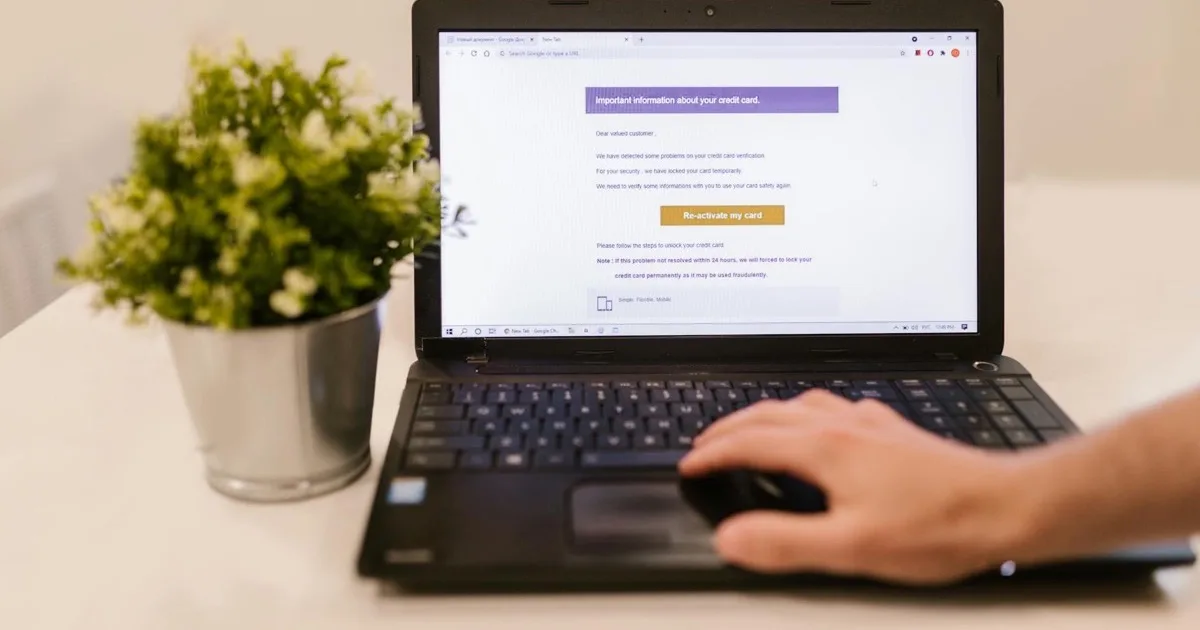
Here’s the short version: phishing is the most common entry point for cyberattacks because it targets human trust, and the only effective defense is layered — email filtering, multi-factor authentication, email authentication (SPF, DKIM, DMARC), and ongoing employee training working together. No single tool stops phishing, but the combination blocks the overwhelming majority of attacks.
The vast majority of business breaches start with a single email. A convincing message tricks an employee into clicking a link, entering a password, or wiring money, and the attacker is in. The Federal Trade Commission (FTC) publishes ongoing guidance on recognizing these scams. This guide explains how phishing works, walks through what a real attack looks like step by step, lays out the layered defenses that stop it, and shows you exactly what to train your team to spot.
How phishing attacks work

Phishing succeeds by impersonating someone you trust. The attacker’s email looks like it’s from your bank, a vendor, a coworker, or your own boss. Common variants include:
| Type | How it works |
|---|---|
| Standard phishing | Mass emails impersonating trusted brands to steal credentials |
| Spear phishing | Targeted emails aimed at a specific person with personal details |
| Business email compromise | Impersonating an executive or vendor to authorize payments |
| Clone phishing | A copy of a real email with malicious links swapped in |
Because these attacks target people, not just technology, they slip past basic spam filters. That’s why phishing remains one of the top cybersecurity threats facing businesses.
The anatomy of a phishing attack, step by step
It helps to see how one of these actually unfolds, because the mechanics are more deliberate than most people assume. First comes reconnaissance: the attacker studies your company on LinkedIn and your website, learning who the CEO is, who handles accounts payable, and which vendors you work with. Next comes the lure: they craft an email that fits that context perfectly — maybe a message that appears to come from the CEO to the bookkeeper, written in a hurried tone, asking for an urgent wire transfer before a deal closes. Then comes the hook: the email creates pressure and a reason not to double-check (“I’m about to board a flight, just handle it”). If the target acts, the payoff follows — money moves, or a password gets harvested on a fake login page that looks identical to the real one. The entire con runs on two ingredients: trust and urgency. Understanding that pattern is the first step to breaking it, because once you know attackers manufacture urgency on purpose, a rushed request becomes a red flag instead of a reason to hurry.
The layers that stop phishing
Defending against phishing takes several controls working together. Remove any one and the others have to work harder.
- Email security gateway. Filters malicious messages before they reach inboxes.
- Multi-factor authentication (MFA). Ensures a stolen password alone can’t unlock an account.
- Email authentication (SPF, DKIM, DMARC). Stops attackers from spoofing your domain.
- Security awareness training. Teaches your team to recognize what slips through.
- Payment verification procedures. A simple callback rule stops most BEC wire fraud.
This layered approach is the heart of effective email and cybersecurity protection. For Los Angeles businesses, it fits within a broader cybersecurity services strategy.
Red flags every employee should learn to spot
No filter catches everything, so the human layer needs a simple checklist. These are the tells that should make anyone slow down and verify before clicking, replying, or paying:
- Urgency and pressure. “Do this now or else” is the oldest trick in the book.
- A mismatched sender address. The display name says your boss; the actual email address doesn’t.
- An unexpected request for money or credentials, especially one that bypasses normal process.
- Links that don’t match. Hover over a link — if the real destination doesn’t match the text, stop.
- Subtle misspellings in the domain, like “micros0ft.com” or an extra letter in a vendor’s name.
- Generic greetings (“Dear Customer”) on a message claiming to be personal or internal.
- A change to payment details — a vendor suddenly asking you to wire to a new bank account is BEC until proven otherwise.
The single most powerful habit you can build into a team is this: when an email asks for money or credentials and feels even slightly off, verify through a different channel — pick up the phone and call the person on a known number. That one rule defeats the majority of business email compromise.
Business email compromise: the costliest variant
It’s worth singling out business email compromise (BEC), because it causes some of the largest financial losses of any cybercrime — and it often involves no malware at all. There’s nothing for a filter to catch: just a well-written email, sent at the right moment, to the right person, asking them to move money. An attacker who has researched your company can impersonate your CEO asking a bookkeeper for an urgent transfer, or impersonate a trusted vendor sending an “updated” invoice with new banking details. Because the message looks legitimate and exploits normal business pressure, technology alone struggles to stop it. The defense is procedural: a hard rule that any payment, or any change to payment details, gets verified by phone using a number you already have on file — never a number or link from the suspicious email itself. It feels bureaucratic right up until the day it saves you fifty thousand dollars.
Why training is the highest-return layer
Technology blocks most attacks, but the cleverest phishing emails are designed to beat filters and reach a human. Your employees are the last line of defense. A team trained to pause, check the sender, and verify unusual requests stops the attacks that technology misses. That’s why employee security awareness training delivers some of the best return of any security spending. The combination of good filtering and trained people is far stronger than either alone.
Why SPF, DKIM, and DMARC matter more than they sound
These three acronyms get glossed over because they’re technical, but they do something simple and valuable: they prove your email is really from you, and they stop criminals from sending email that pretends to be from you. Think of them as the difference between a signature anyone can forge and a tamper-proof seal. SPF publishes a list of the servers allowed to send mail for your domain, so a message from some random server claiming to be your company gets flagged. DKIM adds a cryptographic signature to your outgoing mail, proving it wasn’t altered in transit and genuinely came from your domain. DMARC ties the two together and tells receiving mail servers exactly what to do with messages that fail the checks — reject them, quarantine them, or report them. Configured properly, this trio makes it dramatically harder for an attacker to spoof your domain and impersonate your brand to your own customers and staff. It’s invisible plumbing, but it protects your reputation as much as your inbox — and far too many businesses leave it switched off.

What email security costs
| Layer | Typical cost | Notes |
|---|---|---|
| Email security gateway | $3 to $10 per user/month | Filters threats before delivery |
| Security awareness training | $1 to $5 per user/month | Often bundled with security plans |
Set this against the cost of a single successful breach — frequently six figures for a small business once you count fraud, downtime, and recovery — and email security is one of the best investments you can make.
Don’t forget backups
Even strong defenses can occasionally be beaten, and some phishing leads to ransomware. Tested backups and disaster recovery ensure that even a successful attack can’t take your data permanently. Defense and recovery together make your business resilient.
What to do when someone does click
No defense is perfect, so every business should have a simple plan for the moment an employee realizes they clicked or entered a password into a fake page. Speed matters enormously here, and the right response is the opposite of panic or shame. The employee should report it immediately — which is exactly why a blame-free culture pays off, because people who fear punishment hide their mistakes until it’s too late. From there, the response is straightforward: change the compromised password right away, sign the account out everywhere, and rely on multi-factor authentication to blunt the damage while you act. Your IT team should check the account for forwarding rules the attacker may have added, watch for suspicious logins, and confirm nothing else was touched. If money was involved, contact the bank instantly — fast reporting is sometimes the difference between recovering a wire and losing it. The businesses that weather phishing best aren’t the ones that never get fooled; they’re the ones that catch it in minutes and respond calmly, because they decided what to do before it happened.
Close the door attackers use most
Email is the front door of nearly every cyberattack. Contact Secure Techies to deploy layered phishing and email protection for your business, complete with employee training that turns your team into a strong final line of defense.
Frequently Asked Questions
