Here’s the short version: Secure Techies vs a typical MSP is the difference between a named local team with a written SLA, flat-rate billing, and optional yard cameras, and a remote ticket mill that bills extras and leans on lock-in. Most “why you and not them” questions collapse in one table.
Buyers already know they need managed IT. The hard part is telling one provider from the next when every homepage says 24/7, proactive, and partnership. This page is the gut-check. Read the table first. Then read the rows that actually change the work.
What a typical MSP actually is
A typical MSP is not a villain. It is a business model. Remote monitoring, a shared help desk, a stack of security tools, and a monthly fee. That model can work. It also produces the same complaints we hear on first calls.
Tickets sit. The person who knew your environment last month is gone. The invoice grew because an on-site visit, a firewall license, or “project time” landed outside the plan. Security was a slide in the deck and an add-on in the quote. When you ask to leave, the contract has another 14 months on it.
None of that is rare. CompTIA and other channel research keep showing the same buyer friction: unclear scope, surprise labor, and support that feels like a queue. The FTC’s data security guidance is blunt that “reasonable” security is an ongoing practice, not a product you buy once. A typical MSP that treats security as a later SKU is selling you a gap.
If the only difference between two proposals is the logo, you do not have an MSP comparison. You have two copies of the same offer.
What Secure Techies is built to be
Secure Techies is a Canoga Park company, founded in 2016. About half of our clients are law firms. The rest look like the rest of Southern California: clinics, contractors, warehouses, restaurants, advisors, and growing offices.
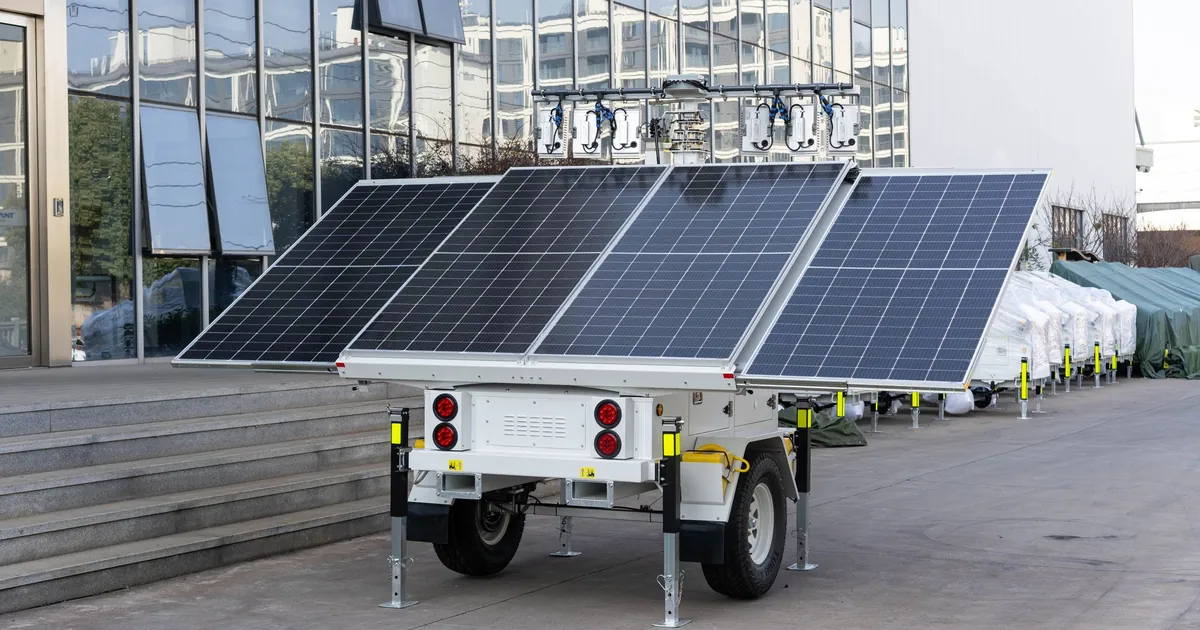
We run managed help desk, cybersecurity, backups, and, when the lot is the risk, mobile CCTV trailers as one relationship. That last piece is not a typical MSP line item. Most providers stop at the firewall and tell you to call a camera company.
Pricing is a flat monthly plan for the agreed scope. Projects (a move, a tenant rebuild, a trailer drop) are quoted separately so the monthly number stays boring. Response targets go in writing. We do not use a multi-year lock-in as the product. Terms live in the proposal. We would rather keep you because the tickets are faster than because a clause says you cannot leave.
That is the whole pitch. The table below is how it looks next to the pattern we replace.
Secure Techies vs a typical MSP
| What to look for | Secure Techies | Typical MSP |
|---|---|---|
| How you get help | ||
| Dedicated local teamA real office, not a logo on a map | YesCanoga Park headquarters. On-site across Los Angeles and Southern California. | SometimesOften remote-first. "Local" can mean a contractor they call when they have to. |
| Named humansSomeone who already knows your environment | YesNamed ownership. You are not starting from zero every ticket. | RareRotating tier-1 queue. Context dies when the shift changes. |
| Written SLAResponse times you can point at | YesNamed response targets in the proposal. Business-stopping issues jump the queue. | Vague"We respond fast" is marketing. Ask what happens when they miss. |
| 24/7 help deskNights, weekends, filing deadlines, dinner service | YesA number people actually call. Average standard response is under two hours. | VariesBusiness hours plus a voicemail, or an offshore after-hours pool with no context. |
| How you pay | ||
| Flat-rate monthly planThe invoice should be boring | YesAgreed scope, one number. Projects quoted separately. | Plus extrasBase fee, then on-site, after-hours, and "project" lines show up later. |
| No multi-year lock-in as the offerStay because it works | YesTerms are written in the proposal. We prefer month-to-month relationships. | Common24-36 month terms, auto-renew, and an exit that takes a lawyer. |
| What they actually cover | ||
| Cybersecurity in the planNot a later upsell | YesMFA, email filtering, endpoint protection, and patching sit inside the work. | Add-onHelp desk first. Security as a second quote after the breach conversation. |
| Backups that have been restoredA backup you never tested is a story | YesRestore tests, including Microsoft 365, not only the old file server. | InstalledSoftware is running. Nobody has pulled a file in a year. |
| Mobile CCTV and the lotOffice IT plus the yard | YesSolar, rapidly deployable trailers. One contract when the lot is the risk. | NoThey will refer a camera vendor. Then two companies blame each other. |
| Public-sector identifiersThings a buyer can look up | YesCAGE 7JZF3. UEI VNXVECFGVAW6. Look them up on SAM.gov. We do not invent a GSA schedule. | UncommonNo CAGE, or a slide that claims vehicles they cannot show. |
| Industry playbooksThe ticket already has a context | YesLaw firms first. Also healthcare, construction, hospitality, warehouses, and the rest of the stack. | GenericOne office playbook, applied to a firm, a clinic, and a jobsite the same way. |
In the planInconsistentUsually missing
That is the visual. The rest of this page is why those rows matter, and when they do not.

Why the typical model feels the same everywhere
Ticket mills and rotating queues
Shared help desks scale. They also forget. Your office manager explains the copier, the hearing room, and the one server that cannot reboot on a Friday, then next week a new agent asks for the same story. Time-to-first-response can look fine on a report while time-to-done is terrible, because nobody owns the account.
We treat a mailbox outage at a firm, a down POS during dinner, or a stalled WMS at a dock as severity, not as ticket 4,812. If you want the operational version of that, read how IT support in Los Angeles should actually commit to an SLA.
Security sold as a later SKU
NIST’s small-business cyber guidance is not exotic. MFA, backups, patching, and a person watching the mailbox are the floor. CISA still publishes a catalog of known exploited vulnerabilities because the same holes keep getting used. A typical MSP that “includes antivirus” and sells everything else later is leaving the floor unfinished.
We put email security, MFA, endpoint protection, and restore tests inside the plan. Extra work exists (a penetration test, a CMMC readiness project). The basics do not wait for a second signature.
Lock-in as a business model
Long contracts are easy to defend: “we invest in onboarding.” Onboarding is real. A three-year trap is not the same thing. If the work is good, you stay. If it is not, a clause will not make the tickets faster.
We write terms in the proposal. We prefer relationships that do not need a lawyer to end. For cost ranges and what a flat plan usually covers, see IT support cost for a small business.
The rows that actually change the work
Most MSPs can stand up Microsoft 365 and a firewall. The rows that change the week are the ones they skip.
The lot. Construction conexes, warehouse yards, hotel parking, overflow lots. Cameras do not replace insurance. They change what happens at 2 a.m. We already run that layer. A typical MSP will introduce you to someone else, then disappear when the trailer needs a human.
The identifiers. Procurement teams search SAM.gov. We publish CAGE 7JZF3 and UEI VNXVECFGVAW6 because they are real. We do not invent a GSA schedule on this site. If a vendor’s “SLED experience” cannot survive a lookup, it is a slide, not a credential. More on how we talk about public-sector work is on the government page.
The industry. A printer ticket is a printer ticket. A mailbox takeover at a firm, a BAA at a clinic, a seasonal scanner at a warehouse, and a guest VLAN next to a card terminal are not. We write those pages on purpose. A typical MSP applies the same office script to all of them.
The SBA’s cybersecurity guidance for small businesses keeps making the same point as the table: patching, backups, and a plan you can explain. Add a local truck and a camera when the site needs them, and you are no longer buying a generic MSP.
Questions worth asking before you sign
Use these on us and on anyone else. The useful answers are short and written.
- Who is on the account next Tuesday, by name?
- What is the response target for a business-stopping outage, and what happens if you miss it?
- What is inside the monthly number, and what is a project?
- Do you deploy cameras, or only talk about physical security?
- What identifiers can a procurement officer look up today?
- How do we leave if this is the wrong fit?
A confident provider answers all six without a discovery call. A shaky one changes the subject to a three-year discount.
When a typical MSP is still the right call
Be honest about fit. A 400-person company with its own IT director, a national footprint, and a mature security team may want a national platform and a co-managed overlay, not a 15-person local shop. A company that only needs a break-fix visit twice a year does not need us either.
We are the better call when you are a Southern California organization that sells time, sees patients, runs a jobsite, or cannot miss a pickup window, and you want one team for the office and, when it matters, the lot. If you already have an internal lead, co-managed IT is common.
How a switch works if you already have one
You do not rip the old vendor out on Friday. You run a parallel handoff: we map access, mail, backups, and vendors, then cut over in a window you approve. Staff should feel better tickets, not a migration weekend. The full playbook is in how to switch IT providers.
If the table already answered the question, contact us for a free assessment. Call (818) 450-5384. We will tell you what we would fix first, including when the honest answer is that you do not need us.
Frequently Asked Questions