Incident response
CrowdStrike Outage Response for a Healthcare Practice
A July 19, 2024 CrowdStrike content update took Windows hosts down worldwide. This is how we recovered one clinic without waiting for a vendor miracle.
- IndustryHealthcare
- WhereSF Valley
- TimelineSame day
- EngagementOutage response
Meet the client
A clinic that could not cancel the morning book
Practice name, staff names, and host names are withheld at the client's request. The date, the vendor defect, and the recovery method are public record.
On July 19, 2024 a defective CrowdStrike Falcon content update crashed Windows hosts worldwide. A San Fernando Valley outpatient clinic called Secure Techies before dawn because exam-room PCs and the front-desk machines would not boot. We triaged what was actually down, recovered what we could remotely, went on-site for BitLocker and no-console machines, and left a written after-action so the next update would not be a surprise.
Primary goals
What success had to look like by 8 a.m.
Open the rooms that had patients
The clinic did not need every laptop. It needed the front desk and the rooms on the morning schedule.
Do the vendor fix without guessing
CrowdStrike and CISA published a recovery path. We followed it. We did not invent a wipe-and-reload for machines we could save.
Leave a runbook, not a war story
The partners wanted to know what happened, which machines were still at risk, and who holds BitLocker keys next time.
The challenge
Every Windows host with Falcon 7.11+ that checked in that window
This was not ransomware and it was not a Microsoft outage. It was a content file that a kernel sensor loaded, and then Windows stopped.
- 01
Machines boot-looped into a crash
Front desk and exam-room PCs running Windows 10 or 11 with Falcon 7.11 or later hit a blue screen after the content update. Macs and Linux were not in play.
- 02
BitLocker blocked the easy fix
Safe Mode is the published recovery path. Encrypted drives asked for a recovery key the staff did not have in a drawer.
- 03
The morning book was already printed
Patients were coming. Paper charts existed for some visits and not for others. Imaging and e-prescribe sat on the crashed hosts.
- 04
Help desk tickets did not stop
Password resets and printer jobs kept arriving. An outage does not pause the rest of the queue.
How we worked
Triage first, then the published recovery, then the keys
We did not wait for CrowdStrike to walk into the clinic. We also did not freelance a reimage on every box. The work followed the vendor and CISA guidance, in the order that got rooms open.
- 01
Declare and split the queue
On-call saw the crash pattern, named it an incident, and split the desk: recovery lane and everything else.
- 02
Inventory who was actually down
Not every PC had Falcon. Not every Falcon host was online in the bad window. We listed rooms, front desk, and the one on-site server.
- 03
Recover what Safe Mode would allow
Where BitLocker was off or the key was in our vault, we booted Safe Mode and removed the defective channel file.
- 04
On-site for locked and headless boxes
Encrypted laptops and the machine with no remote console needed a person, a key, or a recovery USB.
What we examined
Five lanes, one incident channel
The outage was one defect. The work was five different jobs. Mixing them is how a desk loses the morning book.
Endpoint recovery
Safe Mode, the CrowdStrike channel file, and a reboot test before we called a room done.
BitLocker and break-glass
Recovery keys from Entra or the escrow we already held. Machines with no key waited.
Server and shared logins
The on-site box that held shared apps. Last, on purpose, after rooms.
Clinic communications
Which rooms were open, which visits to keep, which to delay. The office manager owned the patient list.
After-action
What we will change: key escrow, who can boot Safe Mode, and how Falcon content is staged.
Safe Mode is a procedure. BitLocker without a key is a locked door.
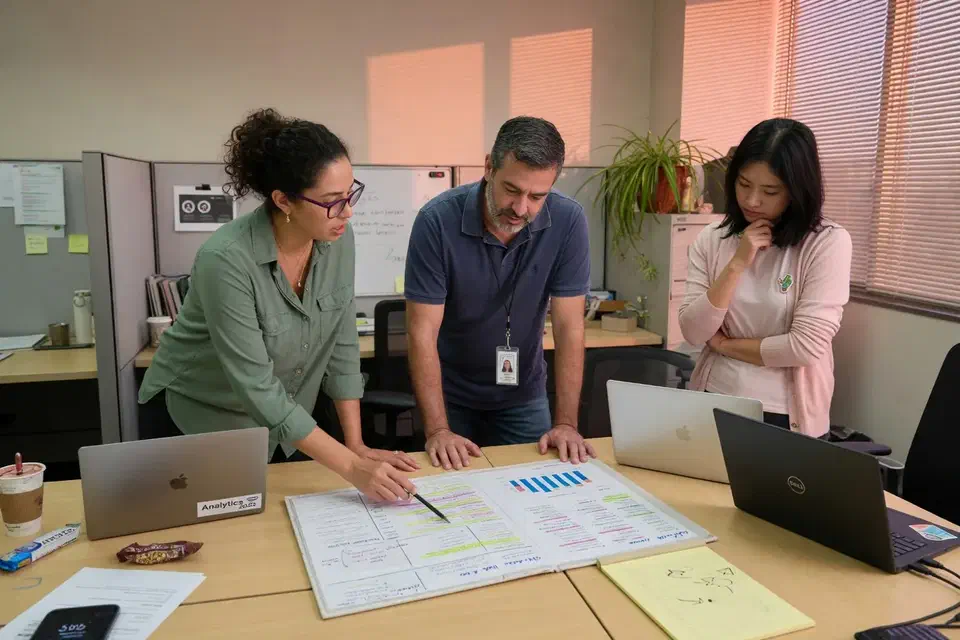
The clinic’s Windows PCs did not boot. The 7 a.m. column on the schedule was still full.
That is the short version of our CrowdStrike outage response on July 19, 2024. A San Fernando Valley outpatient practice called the managed help desk before dawn. Front-desk machines and exam-room PCs were crash-looping. This was not ransomware. It was not a Microsoft outage. It was a defective Falcon content update on Windows, which CrowdStrike later described in its preliminary post-incident review.
We recovered the rooms the morning book needed, finished the rest of that fleet over the weekend, and wrote down what we will not scramble for next time. Practice identifiers stay out. The method does not.
What actually broke
CISA’s same-day alert on the widespread IT outage was clear: Windows 10 and later, CrowdStrike Falcon content, not malicious activity, Mac and Linux not in scope. CrowdStrike’s note to customers said the same. Microsoft later estimated about 8.5 million devices were affected and published how it was helping customers through the outage.
The clinic did not need a global number. It needed to know which of its PCs had Falcon 7.11 or later and had been online in the bad window. Some had. Some did not. The ones that did would not get past a blue screen.
For a healthcare office, that is not an abstract IT event. E-prescribe, imaging viewers, and the check-in list lived on those hosts. Paper charts covered some visits. They did not cover all of them.
How we declared the incident
The on-call engineer saw the same crash on more than one client in a short window. That is the difference between a single broken PC and an incident. We opened an incident channel, named an owner, and split the desk.
One lane recovered crashed Windows hosts. The other lane kept taking ordinary tickets. An incident response plan that dumps every password reset into the same queue as Safe Mode work will lose both.
NIST’s incident handling guidance still holds here: identify, contain what you can, eradicate the bad file, recover, then write lessons. The “containment” in this case was not pulling a network cable. It was stopping people from power-cycling a looping PC into a worse state, and keeping BitLocker prompts from turning into guessed PINs.
What the morning actually looked like
The first useful question was not “when will everything be up.” It was “which rooms have a patient in the next hour.” The office manager read the book. We read the inventory. Those two lists are not the same.
Front desk first, because nobody checks in if that PC is looping. Then the rooms with the earliest remaining appointments. Then the back-office machines that billing could live without until afternoon. The on-site server last, because taking it into Safe Mode would have taken shared apps down for rooms we had just recovered.
Staff still called about printers and a password. Those tickets stayed in the second lane. If you dump them into the recovery channel, the person doing Safe Mode starts resetting passwords and the 8:15 sits in the lobby.
We told the manager the truth in short sentences: room 2 is up, room 3 is waiting on a key, the closet box is after 10. That is communications. It is not a status page.
The rest of the fleet that did not have a patient in the chair finished Saturday and Sunday on the same procedure. Nobody got a hero weekend because we were disorganized on Friday. They got a weekend because encrypted laptops were not all in the building, and keys were not all in the vault.
How we recovered the machines
CrowdStrike and CISA pointed at a local procedure, not a cloud toggle. Microsoft published the same path for IT teams in KB5042421. In practice that meant:
- Boot Windows into Safe Mode or Windows Recovery.
- Remove the defective channel file from the CrowdStrike driver folder.
- Reboot and confirm the host stays up.
- Only then put the room back on the board.
Remote when the key existed
Where we already held a BitLocker recovery key in Entra or our vault, we could do that remotely or walk a staff member through it. A front-desk PC with a person sitting in front of it and a key we could read out is a twenty-minute job. That is how the first rooms opened.
Where nobody could produce a key, the machine waited. Guessing is how you lock the drive for good. Two exam-room laptops sat dark until a provider who was not in the building sent the recovery password from their password manager. That delay was a key problem, not a CrowdStrike problem.
On-site when Safe Mode was not enough
On-site mattered for the headless box in the closet and for machines with no one at the keyboard. That is why the help desk is not only a phone tree. Someone from Canoga Park can be in the Valley with a recovery USB.
We did not reimage first. A wipe feels decisive and wastes the morning. The published fix worked on the hosts that could reach Safe Mode. Imaging stayed in reserve for a single PC that would not take the file delete, and even then we imaged after we knew the room had a spare.
The office manager owned the patient list. We owned the boot order. Mixing those jobs is how a doctor gets told “we are working on it” instead of “room 2 is up, keep 8:15.”
What we would not do
We would not claim this was a cyberattack. CISA said it was not. Repeating that rumor in a waiting room helps nobody.
We would not invent a “75 percent by noon” slide. This page is one clinic. Other Secure Techies clients had different sensor versions, different encryption, and different staffing. Some were barely touched. Some took the weekend. Averaging them into a marketing number would be a lie.
We would not treat Microsoft as the vendor at fault. Windows crashed because a kernel-level sensor loaded a bad file. Microsoft’s public write-up is support, not an admission.
We would not skip the after-action because everyone was tired.
What the after-action changed
The useful work started after the last PC stayed up. Tired people forget. The write-up is how you keep the next Friday from being a remix.
What we found when we were no longer in a hurry
A few hosts had Falcon but were offline during the bad window. They were fine. A few had older sensors. They were fine too. The damage lined up with “7.11 or later, online between the publish and the revert,” which is exactly what CrowdStrike described. That match is how you know you are not chasing a second problem.
BitLocker was the real delay. Keys that were “probably in Azure” were not all in Azure. Two were on a paper sheet in a drawer the weekend manager could not open. One was in a personal Microsoft account. That is not escrow. That is folklore.
Firmware on two laptops made Safe Mode a scavenger hunt. We documented the key sequence per model so the next person does not learn it from a forum at 6 a.m.
What we changed that week
Keys. Every encrypted Windows host on that clinic’s list got its recovery password checked against Entra or our vault. Missing keys were escrowed before the next Friday. Escrow is a control only if someone can open it at 5 a.m.
Who can boot Safe Mode. Policy and firmware that blocked the published path got a ticket with an owner, not a Slack shrug.
Update staging. Kernel-level agents need a ring. Not every clinic can delay Falcon content. Every clinic can decide who goes first: a spare, then the back office, then the rooms.
A one-page runbook. Who declares. Who holds keys. What file to remove. When to drive. That sits next to the backup and disaster recovery notes, because Safe Mode is not a restore, and a restore is what you need when the file delete is not enough.
HHS still expects HIPAA Security Rule safeguards around availability. An outage like this is not a privacy breach by itself. It is an availability event. The clinic’s obligation is to get care moving again and to write down what failed. We helped with the second so they were not reconstructing it from memory a month later. Our IT support for medical practices guide is the broader clinic picture. This page is one Friday.
What a buyer should take from this
If you evaluate MSPs by the logo on the endpoint agent, July 19 was a reminder that the logo can take you down. The question is whether the desk has a recovery lane, keys in a vault, and a person who will show up.
A break-fix shop that shows up Monday will tell you they could have come Friday. The clinic’s problem was Friday. 24/7 only matters if the person who answers can run the procedure and drive if they have to.
If you already have an MSP, ask them three things before the next content update:
- Who is on call at 4 a.m., and do they have a second lane for normal tickets?
- Where are the BitLocker keys, and has anyone used one this year?
- Do you have a written procedure for a kernel-agent failure, or will we invent one on the phone?
Our cybersecurity work after this incident was not a new SKU. It was the after-action: escrow, staging, and the runbook. For a different kind of project record, see the IT risk assessment case study or the Microsoft 365 email migration.
Planning for the next outage
No clinic plans to start Friday with a blue screen. The ones that recover keep a desk that has done the procedure, not a status page and a hope.
Secure Techies works from Canoga Park with healthcare and other Southern California practices. We cannot promise the next vendor Friday will be quiet. We can promise a desk that has already done the procedure, holds the keys, and will drive if Safe Mode is not enough.
Schedule a consultation if you want the runbook written before that Friday. For clinical IT context, see IT support for medical practices.
The outcome
Rooms open, then the rest of the fleet, then the write-up
- Front desk and the first exam rooms recovered in time to keep part of the morning book
- Remaining workstations finished over the weekend with the same procedure
- No wipe-and-reload on machines the published fix could save
- BitLocker keys that were missing got escrowed before the next Friday
- A one-page runbook: who declares, who holds keys, what file to remove
- Normal help-desk tickets kept a separate lane so password resets did not bury recovery
- This was not a penetration test, not a ransomware event, and not a Microsoft outage
Technologies and frameworks
Related services
Work that sits next to this project
More projects
Other case studies
 Wiping Jobsite Devices the Day a Crew Left
 Microsoft 365 Backup When Retention Was Not Enough
Questions
Frequently asked questions
What caused the July 2024 CrowdStrike outage?
How do you recover a PC from the CrowdStrike outage?
Why did BitLocker make the outage worse?
Was this a Microsoft outage?
How should we prepare for the next vendor outage?
Did Secure Techies recover every client in one morning?
Need a desk that shows up when Windows will not?
Secure Techies runs 24/7 help desk and on-site recovery from Canoga Park. If the next update takes the morning book down, you want a runbook and a person, not a ticket number.