Risk and compliance
IT Risk Assessment for a Financial Services Firm
A four-week, NIST-aligned IT risk assessment for a wealth firm that could describe its tools, but not its residual risk.

- IndustryWealth advisory
- WhereSF Valley
- Timeline4 weeks
- EngagementRisk assessment
Meet the client
A wealth firm with questionnaires it could not answer well
Firm name, staff names, and identifying system hostnames are withheld at the client's request. The engagement type, method, and constraints are real.
A regional wealth and advisory firm in the San Fernando Valley asked Secure Techies for an IT risk assessment after a cyber-insurance renewal and a custodian questionnaire demanded evidence, not a list of products. We scoped a four-week review against NIST CSF 2.0, compared perceived risk with what the environment actually showed, and left the client with a ranked register, a 30/60/90-day plan, and a board-readable summary.

Primary goals
What the firm asked us to produce
See the real gaps
Leadership believed security was 'probably fine' because tools were licensed. They needed an independent picture of identity, email, network, and documentation.
Rank what to fix first
A raw scan dump would not help a 30-person firm. They needed a short list ordered by likelihood, impact, and effort.
Leave with a usable plan
Insurance, the custodian, and the managing partners all needed something they could act on. A certification was not in scope and was not promised.
The challenge
They could name products. They could not rank residual risk.
The firm was not starting from zero. Endpoints had a security agent. Microsoft 365 was in daily use. A firewall sat at the edge. What they lacked was a current, honest map of how those pieces actually behaved.
- 01
Questionnaires outran the evidence
Cyber insurance and a custodian both asked how access was reviewed, how backups were tested, and who could move money. The last written answers were three years old.
- 02
Shared mailboxes sat on the wire process
Operations used a shared mailbox for client wiring instructions. MFA and logging around that mailbox were weaker than the partners assumed.
- 03
Policy and practice had drifted apart
Acceptable-use and incident documents existed. Restore tests, access reviews, and vendor inventories did not match those documents.
- 04
No single owner of the risk picture
Day-to-day IT was split between an internal coordinator and a prior vendor. Nobody could point to a current asset list or a last restore date.

How we worked
Four weeks, four stages, one ranked report
We treated this as an assessment, not a penetration-test theater piece and not an audit that issues a seal. Scope was written down before any scan ran.
- 01
Scope the engagement
A half-day workshop listed systems, data types, custodians, and who could approve changes. Out of scope went full red-team work and any claim of certification.
- 02
Collect evidence
We pulled tenant settings, identity roles, firewall configs, backup jobs, and interviews with operations and the managing partner.
- 03
Test the environment
External and authenticated internal vulnerability scans, a Microsoft 365 control review, and a path-to-admin walk of directory and local admin rights.
- 04
Rank and report
Findings were scored with the client in the room, then written as an executive summary, a risk register, and a technical appendix.
What we examined
Seven workstreams, one risk register
We did not run eight disconnected 'assessments' for the slide deck. Each workstream fed the same register so a partner could see why one item sat above another.
Identity and privileged access
Entra ID roles, stale guest accounts, shared mailboxes, and leftover local administrators on advisor laptops.
Microsoft 365 control review
External sharing, audit logging, Defender settings, mailbox forwarding, and whether DMARC was monitoring or enforcing.
Network and remote access
Edge firewall rules, VPN, Wi-Fi segmentation, and whether the closet matched the diagram operations thought they had.
Vulnerability and endpoint hygiene
Authenticated scans plus a sample of advisor laptops. We ranked exploitability, not plugin count.
Data flow and vendor exposure
How client PII and wiring instructions moved between custodians, file shares, email, and personal devices.
Policy versus practice
Incident, backup, and access documents compared with the last restore test, the last access review, and what staff actually did.
NIST CSF 2.0 snapshot
A current-profile note across Govern, Identify, Protect, Detect, Respond, and Recover. Target profile stayed honest for a 30-person firm.
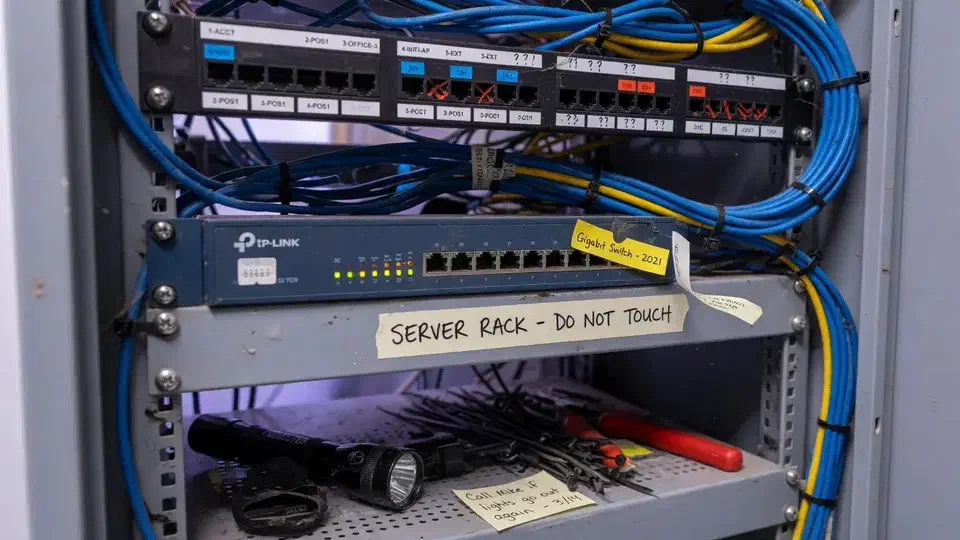
The network closet told a truer story than the policy binder.

The client could list every security product on the invoice. They could not answer, with evidence, which risk would hurt the firm first.
That is the usual starting point for an IT risk assessment. A regional wealth and advisory firm in the San Fernando Valley came to Secure Techies after a cyber-insurance renewal and a custodian questionnaire asked for more than a logo slide. They were new to us. We had no leftover diagrams, no prior tickets, and no reason to assume the last vendor’s paperwork still matched the office.
This case study records how we scoped the work, what we examined, how we ranked findings with the client in the room, and what they left with. Client identifiers stay out. The method does not.
Why the firm called
The firm sits in the same risk class as other financial services offices we support: client records, wiring instructions, custodian portals, and a small staff that cannot afford a week of downtime. IBM’s Cost of a Data Breach reporting has put financial services among the costliest industries for several years. The 2025 report put the sector average at $5.56 million per incident, second only to healthcare (IBM Cost of a Data Breach). That is a global industry average, not a quote for this office. It is still the number underwriters and custodians have in their heads.
FINRA’s cybersecurity topic page is not this firm’s exam binder. It is the vocabulary those questionnaires borrow. The FTC’s small-business cybersecurity guidance makes the same point in plainer language: headcount is not a control. The partners already knew they were too small to bluff. What they did not have was a current, ranked picture they could hand over without improvising.
Two documents forced the issue:
- A cyber-insurance application that asked how often access was reviewed, whether restores were tested, and who held privileged roles.
- A custodian due-diligence packet that wanted MFA coverage, email authentication, and an incident process that matched reality.
The last written answers were three years old. Staff had changed. Microsoft 365 sharing settings had drifted. Nobody could name the date of the last successful restore.
What this engagement was, and was not
Secure Techies sells compliance and security audits as assessments, gap analysis, and documentation support. We do not issue SOC 2 reports, HIPAA attestations, or NIST certifications. Those stay with the assessor the client hires.
We wrote that limit into the statement of work. The partners wanted a usable plan, not a seal they could not honestly display.
Out of scope on purpose:
- A full penetration test
- A SOC 2 Type II examination
- Rewriting every policy on day one
- Pretending a four-week review replaces ongoing cybersecurity operations
In scope:
- Identity and email
- Microsoft 365 tenant controls
- Network edge and remote access
- Vulnerability and endpoint sample
- How client data and wire instructions actually moved
- Whether written procedures matched practice
- A NIST Cybersecurity Framework 2.0 current-profile snapshot
NIST CSF 2.0 is a public framework. It is not a license. We used it because it gives a small firm and a large custodian a shared vocabulary: Govern, Identify, Protect, Detect, Respond, Recover.
How we ran the four weeks
Week 1: scope and interviews
The first half-day was a workshop, not a scan. We listed systems, custodians, who could approve a change, and which laptops left the building. Operations walked us through a wire. The internal coordinator walked us through the closet.
That workshop prevented the usual failure mode: scanning the wrong network and writing a report nobody recognizes.
We also asked the partners to write down, before they saw our findings, where they thought the risk lived. Most named phishing. Almost nobody named the shared mailbox that handled wiring instructions, or the restore that had not been tested in 14 months.
Weeks 2 and 3: evidence and technical review
Evidence came from the tenant, the firewall, backup jobs, and people. A screenshot of a setting beats a memory of a setting.
The technical work followed the same rule we use in a network vulnerability assessment: breadth first, then judgment. Unauthenticated external scans showed what a stranger could see. Authenticated internal scans showed missing patches and local weakness. We discarded noise. A plugin count is not a risk ranking.
The Microsoft 365 review used the same discipline as our Microsoft 365 security checklist: MFA coverage, forwarding, external sharing, audit logs, and whether SPF, DKIM, and DMARC were present or actually enforcing.
Week 4: ranking workshop and readout
We do not mail a 70-page PDF and disappear. The ranking workshop put the partners, operations, and our engineer on the same register. Each item got a likelihood, an impact, and an effort note. Items the firm could not fix this quarter were marked as accepted risk, in writing, with an owner and a review date.
The readout had three layers:
| Audience | What they received |
|---|---|
| Managing partners | Four-page executive summary, insurance-ready |
| Operations | 30/60/90-day plan with owners |
| Technical staff / next MSP | Appendix with evidence, not just adjectives |
What we found
We are not going to invent a “risk score dropped 47 percent” graphic. The useful story is the pattern, which is common in firms this size.
Identity was the real perimeter. MFA was on for most users and missing on a privileged account and the shared operations mailbox. Microsoft documents this as the control that stops a stolen password from becoming a tenant takeover (how Entra multifactor authentication works). Guest accounts from a former contractor were still live. A handful of advisor laptops still had local administrator rights “so the old vendor could install printers.”
Email authentication was half-done. SPF and DKIM existed. DMARC was in monitoring. Microsoft is explicit that anything short of the full set is substandard protection, and that DMARC should follow SPF and DKIM, not sit in “report only” forever (set up DMARC in Microsoft 365). That is better than nothing and weaker than the questionnaire implied.
The closet and the diagram disagreed. The firewall was competent hardware. A few any-any leftovers and an unused VPN profile sat next to rules nobody could explain. Network security work after the assessment started there, not with a forklift upgrade.
Backup existed. Proof did not. Jobs completed. The last documented restore test was 14 months old. A backup you have never restored is a hope, not a control.
Data flow was informal. Client files moved through OneDrive, email, and two custodian portals. External sharing on a few libraries was broader than the partners believed. The wire process still trusted a shared mailbox more than a call-back. That is the same pattern the FBI’s Internet Crime Complaint Center keeps flagging in business email compromise cases: the money moves because the inbox looked familiar (IC3).
Paper and practice had split. Incident and acceptable-use documents were professionally written and three years stale. Staff described a different phone tree than the one in the binder.
None of this required a nation-state. It required an assessment that treated a 30-person firm like a business that moves other people’s money.
How we ranked, not just listed
A register that is 90 rows long will not get funded. We kept the working list short enough for a partners’ meeting.
Week-one items (high impact, modest effort):
- MFA on every privileged and shared mailbox
- Disable stale guests and leftover local admin
- Move DMARC toward enforcement after a monitoring pass
- Schedule and document a restore test
Thirty-to-sixty-day items:
- Tighten OneDrive and SharePoint external sharing
- Replace the informal wire mailbox process with a documented call-back
- Clean firewall leftovers and retire the unused VPN profile
- Refresh the incident phone tree so it matches who actually answers
Ninety-day items:
- Annual access review on a calendar
- Vendor inventory that includes custodians and the prior IT vendor’s leftover access
- A written target profile on NIST CSF 2.0 that a 30-person firm can actually staff
We pointed the partners at our small-business cybersecurity checklist for the hygiene that should sit under any later tool purchase, and at FINRA’s public small-firm cybersecurity checklist so they could see which items an examiner-style list already expects. We also left them the ransomware cost calculator so a downtime conversation had numbers attached, not adjectives.
What the report contained
A useful assessment report is short enough to read and specific enough to staff. This one had four pieces:
- Executive summary. Four pages. What we scoped, the five items that would hurt first, and what “good enough for this firm” looked like in 90 days.
- Risk register. One row per finding. Likelihood, impact, effort, owner, and whether the item was treat, transfer, or accept.
- 30/60/90 plan. Not a wish list. Each line had a definition of done, so MFA coverage and “we talked about MFA” could not be confused.
- Technical appendix. Tenant settings, sample scan output with false positives removed, and the closet notes. This is the packet the next engineer can pick up without a tour.
We kept screenshots in the appendix and adjectives in the summary. Insurers and custodians want both. Partners only have time for the first.
If you want a sense of the hygiene that sits under that packet, the public small-business cybersecurity checklist is the same list we used as a sanity check, sized for offices that do not have a full-time CISO.
What changed after the readout
The assessment itself does not “secure” a firm. Closing items does.
By the time we sat down for the readout, the partners had already approved the week-one list. MFA gaps and stale guests were treated as operations work, not a future project. The restore test was scheduled on a calendar instead of a wish. Insurance and custodian answers were rewritten from the executive summary, with evidence instead of memory.
Secure Techies stayed on for the first wave of remediation under the existing cybersecurity and Microsoft 365 support model. That follow-on work is a separate engagement. This page is about the assessment.
What the firm had that it did not have on day one:
- A single ranked picture both partners would sign
- A document they could hand to an underwriter without improvising
- A 90-day plan with owners
- An honest NIST CSF 2.0 snapshot, including Govern, which is the function most small firms skip
What they still did not have, and should not claim:
- A certification
- A zero-finding environment
- A substitute for daily monitoring and a help desk
Lessons we would repeat on the next one
Write the non-goals down. If you do not say “this is not a pen test” in the statement of work, someone will read the report as if it were.
Ask for perceived risk first. The gap between what leadership fears and what the shared mailbox is doing is usually the most useful slide in the room.
Rank with the client, not at the client. A score we invented in our office will lose to whatever the loudest partner remembers from a conference.
Size the target profile. NIST CSF 2.0 is built for organizations of every size. A 30-person advisory firm does not need an enterprise GRC platform to have a current and target profile. It needs honesty about staff time.
Keep the closet photo. Diagrams lie. Racks rarely do.
Planning your own IT risk assessment
If your insurance, your custodian, your board, or your own partners are asking where you stand, start with a scoped assessment. Bring the last questionnaire, the tenant admin, and whoever actually runs the wire. We will tell you what belongs in a four-week review and what belongs in a later penetration test or monitoring conversation.
Secure Techies works from Canoga Park with firms across Los Angeles and Southern California. Schedule a consultation if you want the same kind of ranked picture this client left with.
For a different kind of project record, see how we handled a Microsoft 365 email migration for a professional services firm.
The outcome
A ranked picture, not a stack of unused PDFs
- A board-readable executive summary the managing partners could hand to insurance and the custodian
- A single risk register scored with the client, not thrown over the wall
- A 30/60/90-day plan with owners, effort, and what 'done' meant for each item
- MFA coverage and email authentication called out as week-one work
- Backup restore testing put back on a calendar instead of assumed
- A NIST CSF 2.0 current-profile note sized for a regional advisory firm
- Clear statement of what this engagement was not: not a pen test, not a SOC 2 report, not a regulator exam
Technologies and frameworks
Related services
Work that sits next to this project
More projects
Other case studies
 Wiping Jobsite Devices the Day a Crew Left
 Microsoft 365 Backup When Retention Was Not Enough
Questions
Frequently asked questions
What is an IT risk assessment?
How is a risk assessment different from a penetration test?
Do you certify us against NIST, SOC 2, or HIPAA?
How long does an IT risk assessment take?
What does a financial firm actually receive?
How often should we repeat a risk assessment?
Need a ranked picture of your own environment?
Secure Techies runs IT risk assessments for Southern California firms that need evidence for insurance, custodians, or their own partners. Start with a conversation in Canoga Park.