Construction and field devices
Wiping Jobsite Devices the Day a Crew Left
A four-week Intune project for a Chatsworth contractor that needed to retire jobsite tablets the day a crew left, not the week someone noticed.
- IndustryConstruction
- WhereChatsworth
- Timeline4 weeks
- EngagementJobsite MDM
Meet the client
A contractor that issued tablets and never took them back
Company name, project names, staff names, and device serials are withheld at the client's request. The engagement type, method, and constraints are real.
A regional contractor based in Chatsworth asked Secure Techies to get jobsite tablets under management after a crew left and the devices still opened drawings and mail. We enrolled corporate tablets in Intune, tested a wipe on a spare, and tied retire to the same-day offboarding path. This was not Autopilot for every laptop and not full MDM of personal phones.
Primary goals
What the contractor asked us to produce
Know which tablets exist
Site tablets had been bought per job. Nobody had a current list of serials, who held them, or which mailbox they used.
Retire on the last day
When a crew left, mail and drawing apps should stop the same day, not after someone noticed a login from a personal apartment.
Prove a wipe before we needed one
A policy that has never been tested is a hope. They wanted a spare tablet wiped in the trailer, then signed back in as a clean device.
The challenge
The office was managed. The trailer was not.
Headquarters Microsoft 365 was in decent shape. Field devices were a drawer of shared iPads and Android tablets with the last superintendent's account still cached.
- 01
Shared logins on site tablets
Whoever opened the trailer that morning used whoever last signed in. Unique IDs existed in the office. They did not exist in the field.
- 02
Crews change faster than tickets
A job can turn over in a week. Offboarding lived in payroll. It did not live in Intune.
- 03
Drawings and mail on the same device
Project apps and Microsoft 365 sat on the same tablet that went home in a pickup. Loss and leftover access were the same problem.
- 04
Personal phones in the mix
Some supers used personal phones for mail. Full MDM of those phones was not in scope and was not promised.
How we worked
Four weeks: inventory, enroll, wipe test, runbook
We treated this as jobsite MDM for company-owned tablets, not an Autopilot laptop refresh and not a CCTV project. Scope was written down before the first wipe.
- 01
Inventory devices and owners
Serials, sites, who held them, and which mailbox or project app they used. Out of scope: personal phones as fully managed devices, and PLC or crane networks.
- 02
Enroll company tablets
Intune enrollment for corporate iPads and Android tablets. Superintendents got a unique sign-in, not a shared trailer account.
- 03
Wipe a spare on site
A test tablet was wiped in the trailer, confirmed empty, then set up again. The first production retire used the same clicks.
- 04
Tie retire to offboarding
Payroll already knew the last day. We put a same-day Intune retire on that path, with the office manager as the owner.
What we examined
Five workstreams, one last-day path
We did not install five MDM products. Each workstream fed the same question: when the crew leaves Friday, what still opens Saturday.
Device inventory
What exists, who holds it, which job it belongs to, and whether it is company-owned.
Enrollment and compliance
Company tablets in Intune. A compliance policy that is honest for a dusty trailer, not a hospital.
App protection where BYOD stayed
Personal phones that only needed Outlook wrapped, not a full device wipe. That is a different control.
Wipe and retire actions
Microsoft's wipe and retire remote actions, tested on a spare before anyone's production tablet.
Offboarding runbook
Last day: disable sign-in, retire the tablet, collect it if it is still on site. The [employee offboarding checklist](/blog/employee-offboarding-it-checklist/) is the office version of the same order.
The crew was gone. The tablets still opened yesterday's drawings.
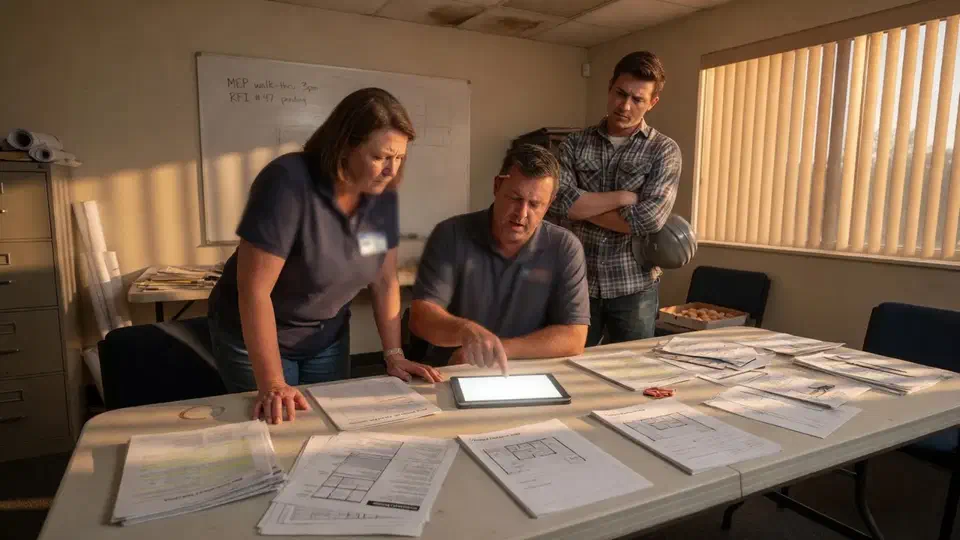
The crew was gone. The jobsite tablets still opened yesterday’s drawings and the superintendent’s mailbox.
A regional contractor based in Chatsworth called Secure Techies after a site turnover left company iPads in a pickup that was no longer on the job. Payroll had ended. Access had not. That is the usual starting point for jobsite MDM, not a laptop Autopilot project and not a camera trailer.
This case study records how we inventoried company tablets, enrolled them in Intune, wiped a spare in the trailer, and tied retire to the same-day offboarding path. Client identifiers stay out. The method does not.
Why the contractor called
The company sits in the same pattern as other construction accounts we support: an office that looks managed, and a moving set of trailers that do not. Drawings, RFIs, and timekeeping live on tablets. Crews change. The last sign-in stays cached.
Microsoft documents the remote action we needed: wipe a device. A wipe on a company-owned tablet can return it to a clean state. A retire removes company data. Neither works if the device was never enrolled.
NIST’s SP 800-124 Revision 2 is the public handbook for enterprise mobile security. We did not implement every control in that document. We used it as a completeness check: inventory, separate company data, a way to revoke, a test.
Two facts forced the issue:
- A tablet that had left with a crew still opened Microsoft 365.
- The office manager could disable a mailbox. She could not see the tablet in any console.
What jobsite MDM is, and is not
This was company-owned tablets and a handful of iPads that lived in trailers. It was not:
- Autopilot for every office laptop. That is a different study: Microsoft Intune without recalling every laptop.
- Full MDM of personal phones. Some supers kept mail on a personal device. Those got app protection policies, which can wrap Outlook without taking the whole phone.
- A mobile CCTV deployment. Cameras are a different product. We did not pretend a wipe policy is a yard trailer.
- OT, PLCs, or crane networks. Those stay out unless a later SOW says so. Same rule as co-managed IT after the internal admin left.
CIS Access Control Management is the language for joiners and leavers. Construction adds a third class: a crew that was never in HR as employees and still held a tablet. The runbook had to name that class or it would fail the first Saturday.
Microsoft lists enrollment options. We picked company-owned enrollment for the tablets we could collect. We did not enroll every personal phone in the yard because we could not collect them.
What this engagement was not
We wrote the non-goals down. If you do not say “this is not full BYOD MDM” in the statement of work, someone will read a wipe test as permission to factory-reset a superintendent’s personal iPhone.
Out of scope on purpose:
- Recalling every office laptop
- Managing personal photos and SMS
- Claiming a crime-rate drop on the lot
- Touching access control panels or cameras
In scope:
- Inventory of company field tablets
- Intune enrollment and unique sign-in
- A spare wipe in the trailer
- Same-day retire on the last day
- App protection only where personal mail stayed
How we ran the four weeks
Week 1: inventory and the honest list
We asked for serials. We got a spreadsheet that was two jobs behind. We walked two trailers and matched devices to people. Tablets that could not be found were treated as lost: disable the account, watch for a later check-in, replace if the job still needed a device.
The useful output of week one was a list the office manager recognized. A console full of unnamed iPads is not an inventory.
We also marked ownership. Company-owned meant we could wipe the whole device. Personal meant app protection only. Anything in between was treated as personal until someone produced a receipt. That sounds petty. It is how you avoid wiping a family iPad because it once opened Procore.
Weeks 2 and 3: enroll and make sign-in unique
Company tablets went into Intune. Shared trailer accounts were retired. Each superintendent got a unique identity. Compliance policies were sized for a dusty trailer: PIN, encryption where the OS supports it, a deadline that did not assume hospital IT.
App protection went on personal phones that only needed Outlook. That wrap is how you avoid the fight about “you are not taking my kids’ photos.” It is also how you avoid pretending you can wipe a phone you do not own.
Enrollment failed on two tablets that had never been updated. We did not force the job to wait on those two. They were collected, updated in the office, then enrolled. A policy that assumes every trailer iPad is on the current OS will fail the first dusty unit.
Cellular check-in is the other honest limit. A wipe command sits until the device phones home. We said that in the trailer so nobody thought Intune was a factory reset over a dead battery. Disable the Entra account anyway. Mail stops. The tablet becomes a brick for company data the next time it finds a tower.
Week 4: wipe a spare, then write the runbook
We took a spare tablet to the trailer. We issued wipe. We watched it return to setup. We enrolled it again. That is the only proof that matters.
Then we ran a tabletop with the office manager: payroll says last day is Friday, she disables sign-in, she issues retire, she notes whether the tablet is still on site to collect. The employee offboarding IT checklist is the same order we use in offices. The field version adds “is the device in a glove box.”
Help desk owns the click after go-live. See managed help desk. A policy nobody can find on a Friday afternoon is not a policy.
We left the office manager a one-page sheet: last day from payroll, disable sign-in, issue retire, note whether the tablet is on site, open a ticket if it has not checked in by the next morning. The sheet names the console and the person, not “IT.” If she is out, the backup owner is on the same sheet. Construction last days do not wait for a unique specialist.
What we found
We are not going to invent a “lost-device incidents dropped 47 percent” graphic. The useful story is the pattern.
The office and the trailer were two companies. Headquarters had MFA. The tablet in the conex did not.
Shared sign-in was the design. It felt faster at 6 a.m. It made retire impossible.
Lost and leftover were the same gap. A tablet that never checks in cannot be wiped. Disabling the cloud account still stops mail. Both steps belong on the last day.
Personal phones needed a different control. Full MDM would have killed the project in the first superintendent meeting. App protection kept mail without taking the device.
CCTV was a separate conversation. The lot had a camera problem. This SOW was devices. Mixing them is how neither job finishes.
Two tablets were “inventory” and not in a trailer. They were in a superintendent’s house. We treated them as lost until they checked in: account disabled, retire queued, replacement issued to the job that still needed a device. Pretending they were on site would have made the inventory a fiction.
The first production retire was boring. That is the goal. Payroll ended Friday. Sign-in died Friday. The tablet checked in Saturday morning and wiped. The office manager sent one email. No war room. If the first retire is dramatic, the runbook failed.
How we ranked what to enroll first
A contractor with four active jobs does not enroll a hundred unknown Androids in week one.
First wave:
- Tablets we could hold in our hands
- Superintendents who actually open drawings
- The shared trailer accounts that had to die
Later:
- Personal phones, app protection only
- Office laptops, if they want Autopilot, as a different project
- A second wipe test after the first production retire
Chatsworth context for ongoing support lives on the Chatsworth location page. Yard cameras, if they become the job, stay on mobile CCTV trailers.
What the contractor received
- A device inventory the office manager could maintain.
- Company tablets enrolled with unique sign-ins.
- A spare wipe performed in the trailer and written down.
- A same-day retire path tied to payroll’s last day.
- App protection where personal mail stayed.
What they still did not have, and should not claim:
- Every personal phone in the yard under MDM
- A guarantee a powered-off tablet wipes instantly
- A theft statistic
- OT or camera work
Lessons we would repeat on the next one
Inventory with your hands. Spreadsheets lie. Trailers less so.
Wipe a spare on site. A wipe that only works on office Wi-Fi is not a jobsite control.
Disable the account even if the tablet is missing. Cloud access dies. The wipe waits for check-in.
Do not start with personal phones. You will lose the room.
Keep CCTV on its own page. Different product, different SOW.
Planning your own jobsite MDM
If crews leave and tablets still open drawings, start with a list of company-owned devices you can hold. Bring payroll’s last-day process. We will tell you what belongs in Intune enrollment, what belongs in app protection, and what belongs in a later laptop or camera conversation. Bring one spare tablet to the first meeting if you have it. The wipe test is cheaper than arguing about whether the console “should work.”
Secure Techies works from Canoga Park with contractors across Los Angeles and Southern California. Schedule a consultation if you want the same kind of retire path this client left with.
For the office version of the last-day order, use the employee offboarding IT checklist. For laptop Autopilot, see Microsoft Intune without recalling every laptop. For how Intune is licensed in a small tenant, see Microsoft Intune for small business. Chatsworth field work also shows up on our Chatsworth location page.
The outcome
A retire button that had been pressed once
- Company jobsite tablets enrolled in Intune with unique sign-ins
- A device inventory the office manager could maintain
- A wipe tested on a spare tablet in the trailer, then documented
- Retire tied to the same-day offboarding path payroll already ran
- App protection only where personal phones stayed in mail, not full MDM of BYOD
- Clear statement of what this was not: not Autopilot for every laptop, not a CCTV study, not a claimed theft-rate drop
Technologies and frameworks
Related services
Work that sits next to this project
More projects
Other case studies
 Microsoft 365 Backup When Retention Was Not Enough
 Conditional Access Without Locking Agents Out
Questions
Frequently asked questions
What is a jobsite device wipe?
Did you fully manage personal phones?
Is this the same as the Intune laptop rollout case study?
What if the tablet is offline when someone is fired?
Is this the same as mobile CCTV for the yard?
What did the contractor actually receive?
Need jobsite tablets you can actually retire?
Secure Techies enrolls field devices for Southern California contractors that already know payroll's last day and still cannot kill the tablet. Start with a conversation in Canoga Park.